Your characters speak with their own voices, move around their world, and the video comes out with music and subtitles. In 2D, 3D or stick figures, vertical for shorts or horizontal for your channel. Everything runs on your computer.
✦ Animated 2D and 3D series✦ Your own characters✦ Narrated videos✦ AI voices✦ AI images✦ Subtitles✦ Music and sounds✦ Atmosphere templates✦ 9:16 · 1:1 · 16:9✦ Spanish and English✦ On your Windows PC✦ Animated 2D and 3D series✦ Your own characters✦ Narrated videos✦ AI voices✦ AI images✦ Subtitles✦ Music and sounds✦ Atmosphere templates✦ 9:16 · 1:1 · 16:9✦ Spanish and English✦ On your Windows PC
Each video came straight out of the app: the script below was written and GhostPeg added the voices, animation, music and subtitles. Made with GhostPeg 1.1 on a Windows PC with an NVIDIA card.
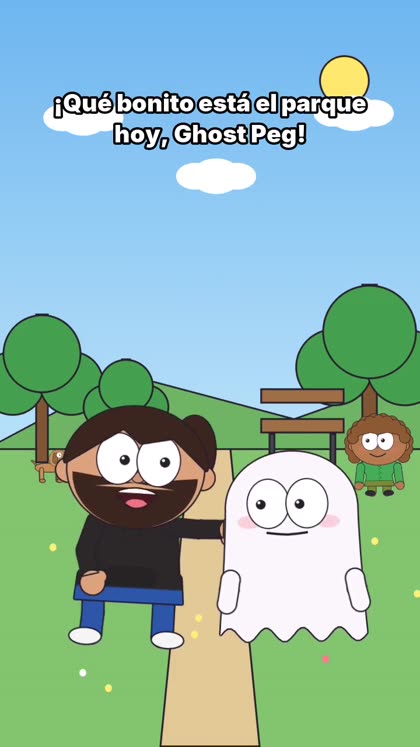
2D · 9:16 · 18 s
Dani and Ghost Peg at the park
See the script that was written (original Spanish script)
Dani: ¡Qué bonito está el parque hoy, Ghost Peg!
Ghost Peg: Sí, pero tengo una idea para un video y no sé editar.
Dani: No hace falta. Escribes la idea y GhostPeg hace el resto.
Ghost Peg: ¿Con voces, música y todo?
Dani: Con voces, música y todo. ¡Mira!
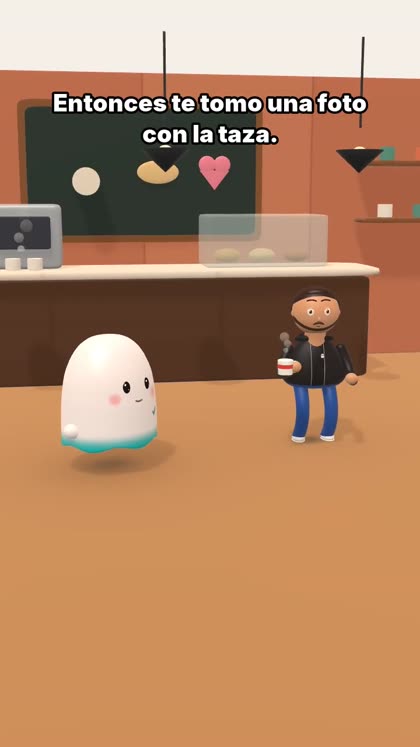
3D · 9:16 · 16 s
A ghost at the café
See the script that was written (original Spanish script)
Ghost Peg: ¡Aquí en la cafetería huele delicioso!
Dani: Dos chocolates calientes, por favor.
Ghost Peg: Espera... yo no puedo beber. ¡Soy un fantasma!
Dani: Entonces te tomo una foto con la taza.
Ghost Peg: ¡Salgo guapísimo!
Ad · 9:16 · 27 s
An ad made from its details
See what was filled in (original Spanish script)
Marca: GhostPeg
Qué vende: un programa para crear videos animados en tu PC
Problema: quieres hacer videos pero no sabes editar
Ventajas: escribes una idea y sale el video con voces y música · series en 2D y 3D con tus propios personajes · todo se hace en tu computadora
Llamado: entra a nuestra web, ghostcreatorpro.com
Eslogan: tu idea, tu video
Guion: plantilla segura (sin inventar datos)
2D story · 16:9 · 25 s
The little forest ghost
With a narrator. The app picked the forest and the background animals from what the story says.
See the script that was written (original Spanish script)
Narrador: En un bosque muy tranquilo vivía un fantasmita llamado Ghost Peg.
Ghost Peg: ¡Hola, árboles! ¿Quieren jugar conmigo?
Narrador: Pero los árboles solo movían sus hojas con el viento.
Dani: Ghost Peg, los árboles no juegan... ¡pero yo sí!
Ghost Peg: ¡Entonces juguemos a las escondidas!
Narrador: Y desde ese día, el bosque nunca volvió a estar en silencio.
HOW IT WORKS
Three steps, one video.
If you don’t like something, there’s no need to start over: change a line, move a character or swap the music, and only that part is redone.
1
Write the idea or your script
One sentence (“Dani and his ghost go to the beach”) or the full script with who says what. If you write “we’re at the café”, the scene happens at the café.
2
Choose the style and the cast
2D, 3D or stick figures. Your characters, gallery ones or one made from a photo. Vertical for shorts or horizontal.
3
GhostPeg makes it
It records the voices, animates, adds the background, intro music and subtitles, and leaves the video ready to watch and export.
NEWANIMATED 2D AND 3D SERIES
Your own animated series. Episode after episode.
Create your characters once and use them all season. GhostPeg writes, animates, voices and exports each episode on your Windows PC.
3D2D
In 3D or 2D
Choose 3D, or 2D with cut-outs or classic cartoon. Each series keeps its own style.
☺
Your characters, in every episode
Create people, animals, creatures and monsters from a photo or from words, and they come back the same in every episode.
✎
From an idea or your script
Write an idea and the AI builds the story, or paste your script and it is made as written: dialogue, narrator, directions, signs and music.
♫
Voices with emotion
A voice for each character, with emotion on every line, plus subtitles and backgrounds drawn by the app or painted by AI.
⏱
From 30 seconds to 10 minutes
A short for social media or a full episode. A simple editor to start and a PRO mode with a timeline.
Ajusta los controles y usa esta receta sobre tu propio contenido.
Por Ghost Creator Pro0 descargas
GHOSTPEG · PLANS
Start free. Unlock more when you need it.
Everything is visible from day one: Pro and Pro Plus features show a lock so you know what each plan unlocks.
🚧 Early access GhostPeg is in active development and improves every week. Try it free today. Pro and Pro Plus will launch at an introductory price (which may rise later): buying them is how you support the creator and keep GhostPeg growing.
✓ Available now
GhostPeg Free
$0forever
Full video editor: your own videos (your wedding, your clips) with no length limit
2D/3D post-production: move and fix characters, actions and shots
Full local AI (depending on your computer)
Standard Pro templates
🔒 Coming soon
🔒 Coming soon · for creators
GhostPeg Pro Plus
$19.99for 30 days · one payment
Everything in Pro
2D and 3D animation with no length limit: series and long episodes
🧸 Kids mode: stories and series with clean language
🏪 Promotions: business videos and ads for clients
🎙️ Specialized storytelling (in preparation)
Premium templates: the Animation studio
🔒 Coming soon
What each plan includes
Free
Pro
Pro Plus
Editor for your videos
No limit · watermark
No limit
No limit
Free web editor (phone, Mac or PC)
✓ watermark
✓ no watermark
✓ no watermark
Watermark
Yes
No
No
Automatic creation
30 s
No limit
No limit
2D and 3D animation
15 s
3 min
No limit
2D/3D post-production
—
✓
✓
AI
Basic
Full
Full
Templates
Free
Standard Pro
Premium
Kids · Promotions · Storytelling
—
—
✓
Community
✓
✓
✓
Pro and Pro Plus will be 30-day passes with a single payment: no automatic renewal and no surprise charges. When a pass ends you go back to Free and keep your projects. Limits are per exported video; the app runs on your Windows PC and speed depends on your hardware. Sales and refunds · Terms of use · Requirements
QUESTIONS
What people ask us.
What computer do I need?
Windows 10 or 11 and, for fast voices and 3D, an NVIDIA graphics card. The videos on this page were made with an RTX 4090; more modest cards take longer, but it works. Basic editing and the workshop do not need AI generation. Check the requirements before installing models.
Are my videos uploaded to the internet?
No. Voices, animation and editing happen on your computer. You decide where to publish your videos.
How long does a video take?
The videos on this page, 16 to 27 seconds long, took under a minute each on an RTX 4090, including voices, animation and video. A long episode or a more modest card takes longer.
Can I make my own animated series?
Yes. Choose 3D or 2D (cut-outs or classic cartoon), create your characters from a photo or from words, and each episode, from 30 seconds to 10 minutes, is built from your idea or your script: voices, subtitles, backgrounds and music. Characters stay the same across the whole series.
Can I make videos for a kids’ channel?
Yes, like the forest story on this page. Each creator reviews their content and follows the rules of the platform where they publish, including made-for-kids settings.
Do I lose my projects if I stop paying for Pro?
Your files and projects remain on your PC. Free has its own export limits. Pro features are enabled while your access is valid.
Where do I download it?
The Download page shows the version available for Windows. If the button isn’t there yet, write to us from Contact and we’ll let you know as soon as it is.
Can I use it on Mac, mobile or Chromebook?
GhostPeg is a Windows application. On a Mac, a phone or a Chromebook you can already use the free video editor in your browser, with your free account. The desktop AI creation needs the Windows installation.
What happens with updates?
Published versions are announced in Updates with their changes. Send feedback and ideas; improvements are announced when they are included in a release.
YOUR STORY DOESN’T HAVE TO WAIT
Your next idea can already be a video.
Download GhostPeg, watch the community’s videos and share what you make.
 Ghost
Ghost